SteamVR Full Body Tracking Info
Written by lunazera
Abstract
This is a collection of various tips and info about how VNyan's SteamVR tracking solution works.
Head Tracker Placement
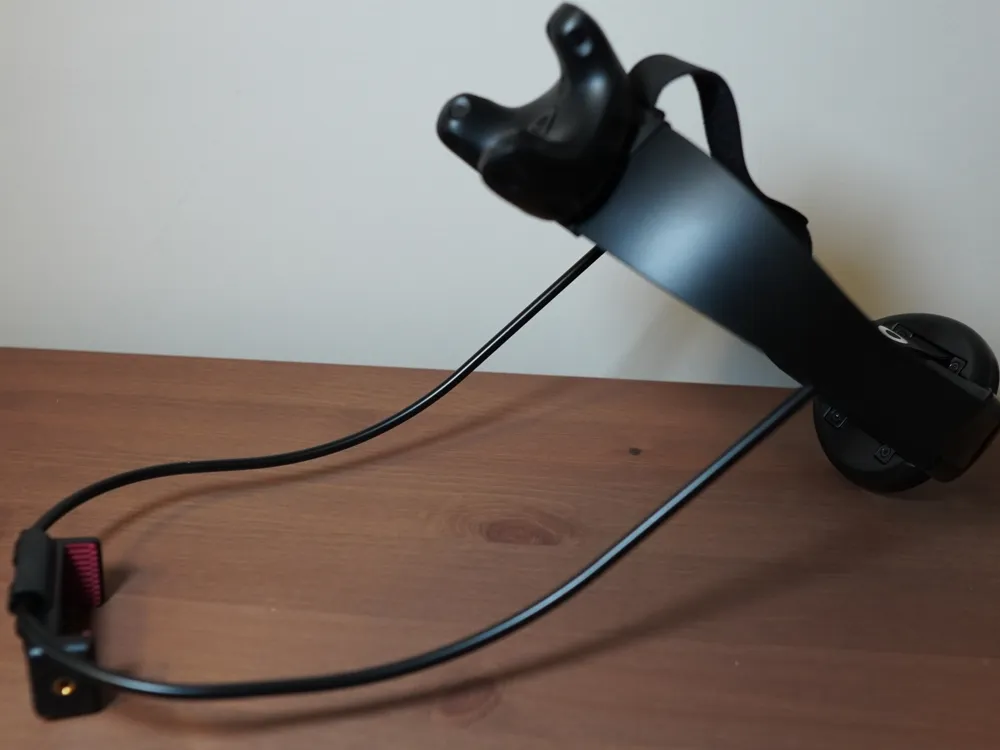
The tracking point you use for your head does not have to be a headset. If you're using Vive trackers, you can put a tracker on a headband or strap that you can fit over your head.
But the tracker must be orientated a certain way. Make sure it is "upright" with the USB port sticking up.
This is because VNyan currently doesn't handle this tracker well, and it'll result in weird tracking motion if this is rotated differently. For example, the picture below is my Rokoko Headrig with a tracker mounted on it, where the usb port is pointed upwards.
SteamVR Room Space
If you're using the full room tracking space, make sure in SteamVR that your room's "forward" direction is towards your monitor. Or mainly, that it's towards where you will most likely be facing already in VNyan without having to rotate in the app.
This room space direction is what determines where you avatar ends up tracking to in VNyan. But it also will cause slight issues when you're facing away. Mainly I've noticed the Upper Chest tracker will twist a bit weirdly/incorrectly when your moving or bending down while you're facing away from that room space forward direction.
Foot Trackers
VNyan's suggestion for foot tracker placement is on your ankles, but you can actually strap them to your feet directly. Either way the foot tracker assignment will bind to your model's foot bone.
Having the trackers on your feet is great for getting more naturalistic foot movement. But there's a rotational issue, if you point your foot down or have your foot back too far you'll probably find your whole leg twist and flip. This is likely a rotational singularity issue, something that's present in other apps too like VRChat (though generally not as pronounced/obvious).
Just something to keep in mind.
Finger Tracking
VNyan supports finger tracking directly from SteamVR, so if you're using Index controllers or other controller setups that have their finger tracking go through SteamVR they should come through into VNyan.
For some other hardware like tracking gloves, you might need to go through a VMC tracking port to get the finger tracking in. For instance, StretchSense's Game XR gloves can send through VMC. You can take this in pretty easily by setting the port on one of VNyan's four VMC tracking layers, which will allow you to adjust smoothing on this tracking data too.
Random Problems you might encounter
- If you calibrate and find that your body is facing the wrong way from your limbs, your hand trackers are likely set to the opposite hands.
- The Upper Chest, Elbow, and Knee tracker spots are IK Pole Targets rather than a tracking point. When tuning these points they should show up a bit further out from your model, either in front (for chest and knees) or behind (for elbows).